> For the complete documentation index, see [llms.txt](https://docs.borndigital.ai/llms.txt). Markdown versions of documentation pages are available by appending `.md` to page URLs; this page is available as [Markdown](https://docs.borndigital.ai/product-changelog/product-changelog.md).

# Product changelog 2026

What is new in Digital Studio in 2026 – every weekly release in short, with screenshots

New platform versions are released to the customer-test environment every Wednesday and, after a week of testing, to customer-prod. Each release below is dated by its customer-test release. This page summarises the changes that matter for building and running Digital Agents, newest first. Releases up to October 2025 are in [Product changelog – 2025 and earlier](/product-changelog/product-changelog-2025-and-earlier.md).

## Release 11.11.2026

<table><thead><tr><th width="366">Application</th><th>Version</th></tr></thead><tbody><tr><td>Builder</td><td>v2.5.284</td></tr><tr><td>Builder Server</td><td>v2.4.172</td></tr><tr><td>NLP Engine &#x26; Intent resolver</td><td>v1.29.78</td></tr><tr><td>Voice</td><td>v1.20.142</td></tr><tr><td>Voice Connector</td><td>v2.0.90</td></tr><tr><td>DA Bubble</td><td>v0.3.135</td></tr><tr><td>Realtime voice control</td><td>v0.0.92</td></tr><tr><td>Responses Control</td><td>v0.0.23</td></tr><tr><td>Conversation State</td><td>v0.0.20</td></tr><tr><td>Outbound API</td><td>v0.0.70</td></tr><tr><td>Outbound Caller</td><td>v0.0.64</td></tr><tr><td>Outbound Cleaner</td><td>v0.0.46 (no change)</td></tr></tbody></table>

### Realtime agents in Digital Studio

* **Recordings:** the **Recordings** tab in the navigation bar lists the agent's finished phone calls, with filters (time, phone number, type, how the call ended, duration), playback and download. Calls are recorded only when **Record calls** is on: an Audio native agent has the switch under **Conversation routing** (set to **Realtime voice**), a Text native agent under **Assign bubbles**. A call appears once it has ended (test conversations and calls handed over to a human are not listed yet), and only calls made after the update are there. See [Test and go live](/realtime-agent/test-and-go-live.md#recordings).

<figure><img src="https://4261467870-files.gitbook.io/~/files/v0/b/gitbook-x-prod.appspot.com/o/spaces%2F6iQTvxgRZRwPS1NgIGEb%2Fuploads%2FZPCo2WYVcUcezXVE9uOy%2Frealtime-record-calls-audio-native.gif?alt=media" alt="The deploy settings of an Audio native agent: Conversation routing is set to Realtime voice, the Record calls switch appears under it and is switched on, then Go live"><figcaption><p>Record calls for an Audio native agent</p></figcaption></figure>

* The agent page and its **Analytics** page have the new Digital Studio look; settings and behaviour are unchanged.
* Moving a slider writes one **History** entry with the old and new value, instead of one entry per step.
* End users no longer see a failing **Organisation admins** section on the **Users** tab.

### Realtime agents: platform

Set up by Born Digital, no change in Digital Studio.

* **ElevenLabs Realtime:** a new speech-to-speech provider with native ElevenLabs voices (**Max** and **Mini**), also with an EU account. Not in Digital Studio yet: Born Digital switches it on for an agent on request; the setting in Digital Studio is coming. See [Voice and listening](/realtime-agent/voice-and-listening.md#elevenlabs-realtime).
* **Protected greeting and goodbye** now also work on phone calls that run through the voice platform, including ElevenLabs Realtime. Set up by Born Digital on request.
* A kiosk or other app can give the agent information about the current customer when the conversation starts; it is added to the agent's prompt for that conversation only. Set up by Born Digital on request.
* A tool can end a digital-human (kiosk) conversation after the agent's last reply, as it already could a phone call.

### Chat bubble

* **Allowed websites:** in **Bubble design** › **Set-up** you can list the websites where the bubble may run – exact HTTPS addresses or `https://*.` for all subdomains. On any other website the bubble does not start, even if someone copies your deployment script. An empty list keeps the bubble open to every website, as before. See [Bubble design](/digital-agent/chat-bubble/bubble-design.md#allowed-websites).

<figure><img src="https://4261467870-files.gitbook.io/~/files/v0/b/gitbook-x-prod.appspot.com/o/spaces%2F6iQTvxgRZRwPS1NgIGEb%2Fuploads%2Fnrl6h98MwpjbHKJAJbAZ%2Fbubble-design-allowed-websites.png?alt=media" alt="The Allowed websites section on the Set-up tab: the help text Leave the list empty to allow embedding on any website, the Website origin field and two added origins https://www.example.com and https://*.example.com"><figcaption><p>Allowed websites with an exact address and a wildcard subdomain</p></figcaption></figure>

{% hint style="warning" %}
Before you fill in **Allowed websites**, list every site where the bubble is embedded, including test and staging sites – a site missing from the list stops showing the bubble after publishing.
{% endhint %}

* **Assistant avatar size:** a slider in **Colors** › **Assistant input** sets the size of the agent's picture next to its messages, from 24 to 64 px. Existing bubbles keep 28 px. See [Bubble design](/digital-agent/chat-bubble/bubble-design.md#colors-tab).

<figure><img src="https://4261467870-files.gitbook.io/~/files/v0/b/gitbook-x-prod.appspot.com/o/spaces%2F6iQTvxgRZRwPS1NgIGEb%2Fuploads%2FgKJWoBuk65N5xAR57we4%2Fbubble-design-avatar-size.png?alt=media" alt="The Assistant input section on the Colors tab with the slider Assistant avatar size: 28 px, from 24 px to 64 px"><figcaption><p>Assistant avatar size on the Colors tab</p></figcaption></figure>

* **Data masking** now also hides compact birth dates such as `23.jula99` and any other number with six or more digits, for example client references and larger amounts. It works in chat bubble conversations, typed and spoken, once the flow sets `data_masking` to `true`. A flow that needs such numbers in clear lists its types in `data_masking_detectors` without `numericString`. See [Data masking](/digital-agent/advanced-functions/data-masking.md).
* **Forms without customer data in the log:** a `Form` widget can send a fixed text such as `form_submitted` as the customer's hidden message instead of the entered values. The values still reach the flow as variables. See [Widgets](/digital-agent/advanced-functions/widgets.md#how-the-json-is-built).
* **Charts in messages:** any bot message can contain a chart. The flow or the AI writes the chart definition (a [Vega](https://vega.github.io/vega/) specification with its data) in a code block marked `chart (vega)` inside the message text, and the bubble draws it in place of the block, fitted to the chat width, between the surrounding text. Under the chart, **Download PNG** saves it as an image and **Show data** opens its data as a table that can be copied into a spreadsheet; tooltips show the values. Flow variables set number and date format (`chart_locale`, e.g. `cs-CZ`), the button texts (`chart_texts`) and the colours (`chart_palette`, e.g. `born-digital`). A chart that cannot be drawn shows an error in its place, the rest of the message stays. The same chart can also be part of a widget (`Graph`).

<figure><img src="https://4261467870-files.gitbook.io/~/files/v0/b/gitbook-x-prod.appspot.com/o/spaces%2F6iQTvxgRZRwPS1NgIGEb%2Fuploads%2FjcXMLoRoDcc9xjKO7dg7%2Fbubble-chart-in-message.png?alt=media" alt="A line chart in a bot message in the chat bubble: title, two series E-maily and Hovory over two weeks, and the buttons Stáhnout PNG and Zobrazit data under it, with Czech button texts set by the flow"><figcaption><p>A chart in a bot message, with Czech texts and number format</p></figcaption></figure>

* **Mobile apps** can embed the bubble through ready-made iOS and Android components; the inactivity reminder and conversation timeout work there too. Set up by Born Digital on request.
* A long unsent message no longer hides the end of the conversation on narrow screens.
* A photo attached in the bubble can be sent without text.
* On iPhone, tapping the message field no longer zooms the page so the chat became wider than the screen.
* Pages that host the bubble receive its notifications in every open tab of the conversation.

### Digital Studio

* **ElevenLabs listening settings in the Answer node:** **Listening features** now show the project's **STT provider**, and with ElevenLabs the section **ElevenLabs · Speech recognition** with **Expected languages**, **Keyterms**, **Entity detection** and **Background noise filter**. Before, these settings could only be set as flow variables. See [ANSWER node](/digital-agent/conversation-flow/nodes-explained/answer-node.md#speech-recognition-settings).

<figure><img src="https://4261467870-files.gitbook.io/~/files/v0/b/gitbook-x-prod.appspot.com/o/spaces%2F6iQTvxgRZRwPS1NgIGEb%2Fuploads%2Fswp3YwiA5W7zhdjexjaK%2Fanswer-node-elevenlabs-listening-config.png?alt=media" alt="Listening features of an Answer node with STT provider ElevenLabs and the section ElevenLabs · Speech recognition with all four settings switched on: Expected languages English and German, Keyterms UNESCO, World Heritage and Angkor Wat, Entity detection Personal data (PII) and Background noise filter"><figcaption><p>ElevenLabs speech recognition settings in the Answer node, all switched on</p></figcaption></figure>

* **Campaign detail:** **Search numbers** finds a contact by phone number, and **Called at** shows the time before the date. The page no longer reloads on its own every two minutes – it loads when you open it; click **Refresh** to see the progress of a running campaign. See [Running and monitoring](/digital-agent/campaigns/running-and-monitoring.md#campaign-detail).
* The **START** node can no longer be deleted or cut by mistake – a flow without it had no entry point.
* Importing a flow as JSON works again for flows with an AI node.
* Prompt conditions can import a stored MongoDB filter, which is checked before it is saved.

### Voice agents

* **Pronunciation dictionary:** the flow variable `tts_pronunciation` replaces words just before speech synthesis, so names and phrases sound the same in every reply; the chat text stays as written. See [Voice variables](/digital-agent/voice/voice-variables.md#pronunciation).

### Other changes

* Form answers, secret and not-logged variables and credentials in web requests stay out of the technical logs.
* A rare fault in the phone connection no longer drops every call running on the same server.
* Dependencies updated for published vulnerabilities.

## Release 04.11.2026

<table><thead><tr><th width="366">Application</th><th>Version</th></tr></thead><tbody><tr><td>Builder</td><td>v2.5.265</td></tr><tr><td>Builder Server</td><td>v2.4.166</td></tr><tr><td>NLP Engine &#x26; Intent resolver</td><td>v1.29.72</td></tr><tr><td>Voice</td><td>v1.20.132</td></tr><tr><td>Voice Connector</td><td>v2.0.89</td></tr><tr><td>DA Bubble</td><td>v0.3.123</td></tr><tr><td>Realtime voice control</td><td>development build after v0.0.87</td></tr><tr><td>Responses Control</td><td>v0.0.19</td></tr><tr><td>Conversation State</td><td>v0.0.19 (no change)</td></tr><tr><td>Outbound API</td><td>v0.0.69</td></tr><tr><td>Outbound Caller</td><td>v0.0.63</td></tr><tr><td>Outbound Cleaner</td><td>v0.0.46</td></tr></tbody></table>

This release also contains the voice, campaign callback and realtime updates that reached customer-test between 28.10. and 3.11.

### Realtime agents: Text native mode

{% embed url="<https://4261467870-files.gitbook.io/~/files/v0/b/gitbook-x-prod.appspot.com/o/spaces%2F6iQTvxgRZRwPS1NgIGEb%2Fuploads%2FSfX07JUbtBfEzDirUHKU%2Ftext-native-explainer-v3.mp4?alt=media>" %}
Text native in 48 seconds: the new way to build agentic chatbot conversations, built on the realtime principle – when to use it, and how to set it up, test it and go live.
{% endembed %}

* **Text native** is a realtime agent for chat conversations: the same Identity, skills and MCP servers, any language model writes the answers, and speech-to-text and a voice can be added so customers can also talk in the chat bubble. Choose it when you create the project, or with the **Audio native** / **Text native** tabs at the top of the settings. Each mode keeps its own settings – switch back and they return as you left them. See [Audio native vs Text native](/realtime-agent/audio-native-vs-text-native.md).
* A Text native agent goes live in chat bubbles: pick them in **Assign bubbles** and click **Go live**. Phone numbers stay Audio native for now.
* **Start test** opens a **Test conversation** in a chat bubble next to the editor, without touching your public bubbles. See [Test and go live](/realtime-agent/test-and-go-live.md#audio-native-or-text-native).

<figure><img src="https://4261467870-files.gitbook.io/~/files/v0/b/gitbook-x-prod.appspot.com/o/spaces%2F6iQTvxgRZRwPS1NgIGEb%2Fuploads%2FWhuOgH1DoW8WAxgJNNNq%2Frealtime-test-text-test.gif?alt=media" alt="Start test opens a Test conversation in a chat bubble next to the editor; the agent greets, answers the question Are you open on Saturday? and the test is ended with End test"><figcaption><p>Testing a Text native agent in the chat bubble</p></figcaption></figure>

{% hint style="warning" %}
Phone numbers and bubbles of an agent are now stored in its deployment settings instead of its voice settings. Existing agents are moved automatically. If you change agents through the API, use the new deployment targets.
{% endhint %}

* In Text native mode, an agent that switches to a skill keeps its own prompt and tools and the skill adds its own on top – the same as in Audio native.
* The prompt is kept for reminders and goodbyes the agent says on its own.
* The retired ElevenLabs model `eleven_turbo_v2_5` is no longer offered.

### Digital Studio

* **Launch or stop several campaigns:** tick campaigns in the list (or **Select all**) and click **Launch campaigns** or **Stop campaigns**. Campaigns that are already running, finished or not running are skipped and listed. See [Running and monitoring](/digital-agent/campaigns/running-and-monitoring.md#launch-or-stop-several-campaigns).

<figure><img src="https://4261467870-files.gitbook.io/~/files/v0/b/gitbook-x-prod.appspot.com/o/spaces%2F6iQTvxgRZRwPS1NgIGEb%2Fuploads%2FEBvFpiwcaR1CFbVUeD58%2Fcampaigns-running-bulk-launch.png?alt=media" alt="The Launch campaigns dialog: two not running continuous campaigns ticked, and 2 selected campaigns will be skipped because one is Already finished and one is Already running"><figcaption><p>Campaigns that are already running or finished are skipped</p></figcaption></figure>

* **Rename variables:** in **File** › **Variables overview**, click the pencil next to a variable and enter a new name – Studio renames it in every node. See [User interface basics](/digital-agent/conversation-flow/user-interface-basics.md).

<figure><img src="https://4261467870-files.gitbook.io/~/files/v0/b/gitbook-x-prod.appspot.com/o/spaces%2F6iQTvxgRZRwPS1NgIGEb%2Fuploads%2FKmVfu1ZMTPr4miH4lAuk%2Fui-basics-variables-rename.gif?alt=media" alt="In Variables overview the pencil next to customer_name is clicked, the name is changed to client_name and confirmed; the message of MSG_WELCOME then shows {client_name}"><figcaption><p>Renaming a variable in Variables overview</p></figcaption></figure>

* Technical variables the platform needs stay available: if they are missing from the **Api editable** list, Studio warns and offers **Restore technical variables**.
* **Deploy** from the flow editor preselects the phone numbers and bubbles that run any version of the project. Check the list before deploying. See [Deploy Project](/digital-agent/workspace/deploy-project.md).

<figure><img src="https://4261467870-files.gitbook.io/~/files/v0/b/gitbook-x-prod.appspot.com/o/spaces%2F6iQTvxgRZRwPS1NgIGEb%2Fuploads%2FoG2y09m8hjGpOk47n3Gn%2Fdeploy-project-bubbles-preselected.gif?alt=media" alt="Deploy in the flow editor opens the Deploy dialog with the bubble My first agent – website already in Assign Bubbles, highlighted"><figcaption><p>Deploy from the flow editor: the bubble that runs the project is preselected</p></figcaption></figure>

* **Invalid widget JSON** in an Answer node is shown next to the editor and the node cannot be saved until it is fixed. Before, the widget was silently dropped.

<figure><img src="https://4261467870-files.gitbook.io/~/files/v0/b/gitbook-x-prod.appspot.com/o/spaces%2F6iQTvxgRZRwPS1NgIGEb%2Fuploads%2Fe46kvcwXPtRRDlh8ul6n%2Fconversation-flow-widget-json-invalid.gif?alt=media" alt="In the Configuration tab of an Answer node the Widget JSON code is incomplete; the error appears below the editor, and closing the node is refused with the error at the top"><figcaption><p>Invalid widget JSON is shown and blocks closing the node</p></figcaption></figure>

{% hint style="warning" %}
A flow that already contains invalid widget JSON cannot be saved, trained or versioned until you fix the JSON in the Answer node.
{% endhint %}

* **Cut** (Ctrl/Cmd+X) copies the nodes to the clipboard first, so you can paste them back.
* A link into Studio opened while signed out takes you to the login page and back to the link afterwards.
* Copied projects get their own MCP connections; editing or deleting them no longer affects the original project.
* **Recordings** can again be searched by phone number and by part of the call ID.
* **Bubble design** export with the closed-bubble reminder set to never hide can be imported again.
* The **Voicebot phone number** field in the campaign form loads quickly again.
* A Modal announcement with an empty confirmation label is exported with `OK` instead of disappearing.
* **Fixed:** the Decision node no longer shows the barge-in description under **Conditions**; phone number organizations are sorted alphabetically; the logo, sidebar and selection controls follow the current design.

### Knowledge base

* **Select all** in the index list selects all loaded indexes for **Duplicate**, **Export** or **Delete**. See [Manage indexes and documents](/digital-agent/advanced-functions/knowledge-base/manage-indexes-and-documents.md#work-with-several-indexes-or-documents).

<figure><img src="https://4261467870-files.gitbook.io/~/files/v0/b/gitbook-x-prod.appspot.com/o/spaces%2F6iQTvxgRZRwPS1NgIGEb%2Fuploads%2FR1PfL0vq8z2hYRduXndD%2Fkb-index-select-all.png?alt=media" alt="The selection bar of the knowledge base: first 0 index selected with Select all, Duplicate, Export, Delete and Done; then 50 index selected with Clear selection"><figcaption><p>Select all, and Clear selection once all indexes are ticked</p></figcaption></figure>

* **Snippet size** goes from 100 to 2000 tokens – the slider used to offer up to 4000, but uploads with more than 2000 failed. Existing indexes with a larger size stay searchable. See [Index providers and settings](/digital-agent/advanced-functions/knowledge-base/index-providers-and-settings.md#snippet-size).

### Insights

* Importing an exported analytics configuration no longer skips prompts that used a custom provider. The provider is not in the file any more – set it again in the target project.

### Voice agents

* A bot reply that starts with blank text no longer plays a silent pause – outbound calls answered about one second faster per turn.
* An inbound call from a number your campaign called back finds the campaign's call details across the whole organization.

### DA Bubble

* A message resent after a short network drop appears only once.
* Messages from a human agent in Sprinklr are sent again until the chat confirms them, so they are not lost when the customer's connection drops.
* A new browser tab no longer brings back a conversation that has already ended.
* Answered forms keep the selections and text you submitted.
* **The Still there? panel follows your colours:** with a dark bubble design, the inactivity overlay and the mobile backdrop used to stay pale; they now use the bubble's colours.

### Other changes

* Dependencies updated for published vulnerabilities.

## Release 28.10.2026

<table><thead><tr><th width="366">Application</th><th>Version</th></tr></thead><tbody><tr><td>Builder</td><td>v2.5.244</td></tr><tr><td>Builder Server</td><td>v2.4.155</td></tr><tr><td>NLP Engine &#x26; Intent resolver</td><td>v1.29.63</td></tr><tr><td>Voice</td><td>v1.20.124</td></tr><tr><td>Voice Connector</td><td>v2.0.88</td></tr><tr><td>DA Bubble</td><td>v0.3.116</td></tr><tr><td>Realtime voice control</td><td>v0.0.82</td></tr></tbody></table>

This release also contains the DA Bubble, voice and realtime updates that reached customer-test between 21.10. and 27.10.

### DA Bubble: chats recover after an outage

* When the network or the browser tab comes back, the chat reconnects by itself. Meanwhile it shows **Connection lost** and keeps the input visible – no more *Unknown Error* dead end.
* When a conversation has ended and cannot be resumed, the bubble shows **Conversation ended** with a **Start new conversation** button. The earlier messages stay visible.
* You can rewrite these texts in **Bubble design** › **Text**. See [Bubble design](/digital-agent/chat-bubble/bubble-design.md#text-tab).

<figure><img src="https://4261467870-files.gitbook.io/~/files/v0/b/gitbook-x-prod.appspot.com/o/spaces%2F6iQTvxgRZRwPS1NgIGEb%2Fuploads%2FU4T4InL9Dm14N4Dcijsb%2Fbubble-design-conversation-ended.png?alt=media" alt="The Text tab of Bubble design with the Conversation ended texts open for editing – Title, Description and Button label – and the preview showing Conversation ended with the Start new conversation button"><figcaption><p>The Conversation ended texts and their preview</p></figcaption></figure>

* A chat that connected but never started no longer keeps the input disabled.
* **Light buttons react visibly:** a button or quick reply with a light fill – for example white with a coloured border – used to look the same whether the customer pointed at it, clicked it or did nothing, so it was not clear that it can be clicked. Now its fill turns light grey when the customer points at it and darker grey while it is pressed. The border and text keep your colours. Buttons with a dark fill keep their current behaviour, and outlined buttons and bubbles with custom styling are not affected. See [Bubble design](/digital-agent/chat-bubble/bubble-design.md#colors-tab).

### Digital Studio

* **Your flow is not overwritten:** if the flow was changed in another tab, by a colleague or through the Born Digital MCP, Studio shows **This flow has changed** and keeps your local changes. Save your work as a new version, or reload the newer flow. See [User interface basics](/digital-agent/conversation-flow/user-interface-basics.md#saving-and-versions).

<figure><img src="https://4261467870-files.gitbook.io/~/files/v0/b/gitbook-x-prod.appspot.com/o/spaces%2F6iQTvxgRZRwPS1NgIGEb%2Fuploads%2FzkE2pJKlRowbHWtrDVaa%2Fui-basics-flow-changed.png?alt=media" alt="The dialog This flow has changed over the flow editor: Your local changes are preserved, who changed the flow and when, and the buttons Cancel, Reload current flow and Save version; the bottom bar shows This flow has changed and Save is off"><figcaption><p>The flow was changed elsewhere while you were editing</p></figcaption></figure>

* **Deployment settings are kept:** deploying a new version of a voice project keeps the project's settings, such as **Record calls** and **Repeat question after no answer**. Picking a phone number no longer replaces the form with that number's settings. See [Deploy Project](/digital-agent/workspace/deploy-project.md).
* **Paste where you point:** copied nodes are pasted under the mouse pointer, or in the middle of the view.
* **Bubble design:** changed colours of buttons, radio buttons and text fields are saved again on an existing design. Chat button settings the bubble does not use (icon, icon URL, primary/secondary) are hidden.
* **Knowledge base:** removing a snippet no longer discards your other unsaved edits in the document – it is deleted when the panel closes. The knowledge-base selector in the AI node lists all indexes of the project, not only the newest 20.
* **Fixed:** the **Not recognized** branch of an Answer node is followed again; bubble search in the Deploy dialog ignores letter case; **What's live** shows the avatar of the person who deployed; the **Train** button in Project info stops spinning after training; table searches keep their text when the data refreshes; Slovak and Polish helper texts in the Tools section are no longer swapped.

### New flow Tools: send a call to Insights

`send_call_to_analytics` sends a finished voice call – its recording or its transcript, plus flow variables you pick – to an Insights project, the way realtime agents already do. Pick the variables in **Metadata variables** from a list of the flow's variables instead of typing them. Set up by Born Digital on request. See [Conversation & state](/digital-agent/tools-reference/conversation-and-state.md#send-call-to-analytics).

<figure><img src="https://4261467870-files.gitbook.io/~/files/v0/b/gitbook-x-prod.appspot.com/o/spaces%2F6iQTvxgRZRwPS1NgIGEb%2Fuploads%2FurwwYvmdTtkhgPmrER44%2Ftools-send-call-to-analytics-metadata.png?alt=media" alt="The Send call to analytics tool in a flow node with Analyse set to transcript, two flow variables picked in Metadata variables and the hint listing what is always sent"><figcaption><p>Flow variables picked as call metadata</p></figcaption></figure>

### Voice agents

* **Speech while the agent thinks:** the new variable `barge_in_type` decides what happens when the caller speaks while the agent prepares its answer – `queue_while_thinking` answers it right after the reply, `ignore_while_thinking` ignores it. Once the agent talks, two or more words interrupt it. Flows without the variable work as before. See [Listening and timing](/digital-agent/voice/listening-and-timing.md#interruptions-barge-in).
* **Longer pauses inside a question:** `azure_segmentation_silence_timeout_ms` sets how long a pause ends a phrase, so a question with a short pause is not split in two. See [Voice variables](/digital-agent/voice/voice-variables.md).
* A caller answering a short closing question no longer loses the first second of the answer, a question asked while the agent was thinking is no longer lost, and the no-input timer starts only when the answer has finished playing.
* Caller numbers sent with a display name (for example by some operators' main lines) reach the flow correctly.
* Speech usage right after a hang-up is counted for the right project.

### Insights

* **Project prompt:** **Prompts** › **Project prompt** holds LLM instructions for every prompt of the project. A prompt with its own instructions keeps them. See [Prompts](/insights/workspace/design/prompts.md#project-prompt).

<figure><img src="https://4261467870-files.gitbook.io/~/files/v0/b/gitbook-x-prod.appspot.com/o/spaces%2F6iQTvxgRZRwPS1NgIGEb%2Fuploads%2FmDrJXZqTrmmrQevuKyEN%2Finsights-prompts-project-prompt.png?alt=media" alt="The Prompts page of an Insights project with the expanded Project prompt section and its Definition field above the list of prompts"><figcaption><p>The Project prompt section on the Prompts page</p></figcaption></figure>

* **Rerun costs:** a note next to **Check** and **Rerun** says that a rerun consumes tokens, or that a dry rerun is free. See [Rerun](/insights/workspace/process/rerun.md).
* **More languages:** analytical projects offer every language of Azure speech-to-text – for example Arabic, Korean, Japanese, Hindi and Spanish (Mexico) – and English (UK), Portuguese (Brazil), Dutch (Belgium) and French (Belgium). Romanian projects keep working.
* Call players load the recording when you open them (without playing it) and show the transcript and details at once, also for calls without audio.
* Anonymization of a project's calls and emails can be switched on or off per project. Set up by Born Digital on request.

### Campaigns

* **Statistics** show each call status with its share, for example 432 (43.2%). See [Running and monitoring](/digital-agent/campaigns/running-and-monitoring.md).
* A finished campaign can no longer be started again.

### Other changes

* Prompt-and-tools agents can show cards and quick-reply buttons in the chat bubble. Set up by Born Digital on request; not yet in production.
* Organizations can be created when single sign-on is switched on; membership comes from the groups of your identity provider.
* Dependencies updated for published vulnerabilities.

## Release 21.10.2026

<table><thead><tr><th width="366">Application</th><th>Version</th></tr></thead><tbody><tr><td>Builder</td><td>v2.5.218</td></tr><tr><td>Builder Server</td><td>v2.4.140</td></tr><tr><td>NLP Engine &#x26; Intent resolver</td><td>v1.29.58</td></tr><tr><td>Voice</td><td>v1.20.110</td></tr><tr><td>Voice Connector</td><td>v2.0.85</td></tr><tr><td>DA Bubble</td><td>v0.3.111</td></tr><tr><td>Realtime voice control</td><td>v0.0.80</td></tr></tbody></table>

This release also contains the Digital Studio, realtime and voice connector updates that reached customer-test between 15.10. and 20.10.

### New platform services: responses control and state management

Two new services of the orchestration layer reach customer-test with this release. They run next to the existing flow engine – Digital Agent flows are not affected. See [How agents work](/getting-started/how-agents-work.md).

**Responses control – agents without a flow.** A new way to run an agent: instead of a conversation flow, the agent is a prompt with skills and MCP tools, and the model decides in each turn which of your tools to call. On the phone it works with the same speech-to-text and text-to-speech as flow agents, and it is the backend of GPT-Live agents.

* **Faster to build and change:** a new voice agent needs a prompt and your MCP tools, not a flow; a change is a prompt edit.
* **Latest models:** uses the current OpenAI and Azure OpenAI models and their tool calling directly.
* **One number, one agent:** phone numbers move between realtime and prompt-and-tools agents without conflicts.
* **Goal:** to become the main runtime for new agents and, over time, take over from the flow engine.

**State management – one record of every conversation.** A shared record of each conversation – every call and chat, the transcript in order and the facts learned on the way – whichever channel and whichever kind of agent served it.

* **Calls resume:** a dropped GPT-Live or prompt-and-tools call continues where it stopped.
* **Coming next – no repeated questions across channels:** a customer can move from a call to the chat bubble or WhatsApp, and the next agent – also a different kind of agent – sees what was already said and verified.
* **One place for conversation data:** one transcript for reporting, with expiring and sensitive-marked facts, instead of separate records per channel.
* **Goal:** to become the single record of conversations across all channels and agents.

Set up by Born Digital on request. Not yet in production.

### Digital Studio: stricter permissions

* A project role counts only while the person is a member of the organization the project belongs to. Only Admins of that organization have automatic full access to it.
* **EndUser** members can only view – also in projects where they were listed as Owner or Editor. Changing a user's role to **EndUser** turns their Owner and Editor assignments into Viewer.
* **Realtime agents:** the new **Users** tab in the project details lists the project members and organisation admins. Owners add people and set their role – **Owner**, **Editor** or **Viewer**. Viewers and EndUsers see the editor and history but cannot change anything.
* Editing Insights dashboards, tiles and prompt settings follows the same rules.

See [Users and roles](/getting-started/users-and-roles.md) and [Realtime projects](/realtime-agent/projects.md#who-can-do-what).

<figure><img src="https://4261467870-files.gitbook.io/~/files/v0/b/gitbook-x-prod.appspot.com/o/spaces%2F6iQTvxgRZRwPS1NgIGEb%2Fuploads%2FMLqqPZSUHeaCmXbkdyrZ%2Frealtime-projects-users-tab.png?alt=media" alt="The Users tab of a realtime project with the Project members and Organisation admins buttons, the search field and one member with the role Owner"><figcaption><p>The new Users tab of a realtime project</p></figcaption></figure>

### Insights: a Digital Agent on a dashboard

**Assign Digital Agent** on a dashboard tile picks a Digital Agent project; the dashboard opens with that agent's chat bubble, always on the project's latest trained version. See [Dashboards](/insights/workspace/analyse/dashboards.md).

{% hint style="warning" %}
Agents that were connected to dashboards before this release are not carried over. Assign them again on the tiles.
{% endhint %}

<figure><img src="https://4261467870-files.gitbook.io/~/files/v0/b/gitbook-x-prod.appspot.com/o/spaces%2F6iQTvxgRZRwPS1NgIGEb%2Fuploads%2FN6vZLOWLknJSKpdTaaxJ%2Finsights-dashboards-assign-agent.gif?alt=media" alt="Assigning a Digital Agent to a dashboard tile: the project My first agent is picked in the Assign Digital Agent search and the tile then shows My first agent"><figcaption><p>Assigning a Digital Agent to a dashboard tile</p></figcaption></figure>

### Realtime agents

* **Protected greeting and goodbye:** the greeting cannot be interrupted for a set number of seconds, and the goodbye after the agent ends the call plays to the end – for example a caller's cough no longer cuts off the greeting. Configured by Born Digital in the realtime management console for now; the setting in Digital Studio is coming.
* **GPT-Live voices:** nine new voices (German, French, Hindi, Japanese, Korean). The voice list shows each voice's language, accent and presentation. Saved agents keep their voice. GPT-Live agents are configured by Born Digital in the realtime management console for now; Digital Studio support is coming.
* **Hang up after the answer:** an MCP tool can ask the agent to end the call after its next answer, so a closing that must be said word for word is spoken in full. See [MCP tools](/realtime-agent/mcp-tools.md#built-in-behaviour).
* **Phone calls over the WebSocket route** behave like SIP calls: the agent can end the call, the reasoning effort is applied, outbound campaign calls get their campaign data, the audio is clean, and recordings contain the agent's voice again.
* **Fixed:** results of MCP tools with diacritics are no longer garbled.

### Knowledge base

* Each document shows its **agent lookup count** – how many times an agent's search returned it. See [Manage indexes and documents](/digital-agent/advanced-functions/knowledge-base/manage-indexes-and-documents.md).
* Snippets keep the order you see when you save an edited document.

<figure><img src="https://4261467870-files.gitbook.io/~/files/v0/b/gitbook-x-prod.appspot.com/o/spaces%2F6iQTvxgRZRwPS1NgIGEb%2Fuploads%2FY0B7mbFfU15A1KevvZZK%2Fkb-document-lookup-count.png?alt=media" alt="Documents of a Local index with their snippet count and agent lookup count; the lookup counts are highlighted and the tooltip Agent lookup count is shown"><figcaption><p>The agent lookup count of each document</p></figcaption></figure>

### New flow Tools: temporary download link

`upload_to_blob` can store a file created in the conversation – for example a generated contract – and return a temporary `download_url` for the customer. The link is valid for 60 minutes by default. Set up by Born Digital on request. See [Web, APIs & data](/digital-agent/tools-reference/web-apis-and-data.md#upload-to-blob).

### Campaigns

* **Continuous campaigns:** each phone number added through the campaign API can have its own `scheduled_call_time` – for example a callback time agreed with the customer. Not yet in Studio.
* **Recordings** load only when you play or download them, so campaign details and the call player open faster.

### DA Bubble

* The chat stays usable after long idle periods, after returning to the page and when the same chat is open in several tabs.
* **Fixed:** some replies were not shown and the chat then stopped accepting text.
* An answered form shows each checkbox as the customer submitted it, also after reloading. A checkbox can show its checked state as a fill, a cross or a check mark.

### Other changes

* **Phone numbers:** when you assign several phone numbers and only some of them can be assigned, the others now go live and Studio lists the numbers that failed. Before, the version stayed offline. See [Deploy Project](/digital-agent/workspace/deploy-project.md#general).
* **Less audio kept with Record calls off:** when **Record calls** is off, the temporary recording of the call is deleted when the call ends instead of staying on the server. The audio used to transcribe conference calls is still kept for now; its removal follows in a later release.
* **Voice deployments:** deploying a flow with an empty speech-provider setting or a large configuration no longer fails.
* **Fixed:** right after signing in, the project lists no longer show the error *input must be a 24 character hex string*.
* Long conversations with many knowledge-base calls no longer get slower from turn to turn.
* Dependencies updated for published vulnerabilities.

## Release 14.10.2026

<table><thead><tr><th width="366">Application</th><th>Version</th></tr></thead><tbody><tr><td>Builder</td><td>v2.5.208</td></tr><tr><td>Builder Server</td><td>v2.4.127</td></tr><tr><td>NLP Engine &#x26; Intent resolver</td><td>v1.29.54</td></tr><tr><td>Voice</td><td>v1.20.107</td></tr><tr><td>Voice Connector</td><td>v2.0.81</td></tr><tr><td>DA Bubble</td><td>v0.3.105</td></tr><tr><td>Realtime voice control</td><td>v0.0.71</td></tr></tbody></table>

### Knowledge base: pinned indexes

An index can be **pinned** for the AI node's knowledge-base search: set the variable `pinned_index_names` (or `pinned_index_ids`) to one or more indexes, as a list or comma-separated. The whole content of a pinned index – every chunk with its title – is returned together with each `search_knowledge_base` result, so short, always-relevant texts such as price lists or opening hours are never missed. The regular `index_names` / `index_ids` scope is still required. Pinned content is limited to 100,000 characters; anything longer is cut with a visible note.

### New flow Tools: Normalize images

The new tool **Normalize images** (`normalize_images`) turns photos upright and makes them smaller before you send them to an AI node – for example photos of documents taken on a phone. Arguments: `images` (required), `max_side`, `output` (`same_as_input`, `blob` or `base64`) and `timeout`. If the image service is not available, the original images are returned.

### Realtime agents

* **GPT-Live engine** (`openai_live`): a fast voice model talks to the caller and hands the work to a separate backend model with its own instructions. Billed per second of voice. Set up by Born Digital on request.
* **Google Search grounding** for Gemini agents: the agent can look up current information on the web. Set up by Born Digital on request.

### Digital Studio

* **Sign-in:** after you are signed out because your account signed in on another device, the login page says so. Sessions are renewed before they expire; if renewal fails, Studio asks you to sign in again.
* **Deploy:** the **Voice** section is hidden when you deploy only to chat bubbles (voice and avatar off) with no phone numbers. As soon as a phone number or a voice-enabled bubble is selected, a voice provider and voice are required – the server now rejects such a deployment without them.
* **Insights:** e-mails in the e-mail preview are shown as **Rich HTML** by default (also **Raw text** and **Raw without HTML tags**); downloads of call recordings are recorded in the audit log; the **Add dashboard** dialog shows the label *Dashboard should be visible to whole organization* again.
* **Campaigns:** campaign details have a **Back** button.

<figure><img src="https://4261467870-files.gitbook.io/~/files/v0/b/gitbook-x-prod.appspot.com/o/spaces%2F6iQTvxgRZRwPS1NgIGEb%2Fuploads%2Fgit-blob-c5405b05d73a4fb20af70b7ea8cf0765969294a1%2Ftutorial-step6-assign-bubble.png?alt=media" alt="The Essential tab of the Deploy dialog with only a bubble assigned: no Voice section, Speech to text provider AZURE"><figcaption><p>Deploying only to a chat bubble – the Voice section is hidden</p></figcaption></figure>

### DA Bubble

* Rating thumbs are always visible below the answer – no need to hover.
* Photos of documents (JPEG, PNG) are made smaller before upload: at most 2,000 px and under 1 MB.
* The bubble starts faster.
* Links open correctly when the bubble runs in a WebView of a mobile app.
* Autocomplete suggestions stay visible and the submitted value is shown.

<figure><img src="https://4261467870-files.gitbook.io/~/files/v0/b/gitbook-x-prod.appspot.com/o/spaces%2F6iQTvxgRZRwPS1NgIGEb%2Fuploads%2F7TM0HCqYFXA6k1Pq2Gr9%2Fbubble-rating-thumbs.png?alt=media" alt="The DA Bubble with Rate response on: like and dislike thumbs below every answer, the thumbs of the last answer highlighted"><figcaption><p>Rating thumbs below every answer</p></figcaption></figure>

### Other changes

* **Fixed:** in the **Add intent** dialog, the Utterance field no longer loses focus while you type.
* **Fixed:** an unattended call transfer now reports its real result – rejected or not answered – instead of success; the caller stays on the line unless the flow asks to hang up.
* Dependencies updated for published vulnerabilities.

## Release 07.10.2026

<table><thead><tr><th width="366">Application</th><th>Version</th></tr></thead><tbody><tr><td>Builder</td><td>v2.5.195</td></tr><tr><td>Builder Server</td><td>v2.4.122</td></tr><tr><td>NLP Engine &#x26; Intent resolver</td><td>v1.29.49</td></tr><tr><td>Voice</td><td>v1.20.99</td></tr><tr><td>Voice Connector</td><td>v2.0.78</td></tr><tr><td>DA Bubble</td><td>v0.3.95</td></tr><tr><td>Realtime voice control</td><td>v0.0.68</td></tr></tbody></table>

### Insights: JSON parameters and LLM caching

* **JSON output format** for parameters: one parameter can return several related values as a JSON object, for example a list of products. See [Parameters](/insights/workspace/design/parameters.md#custom).
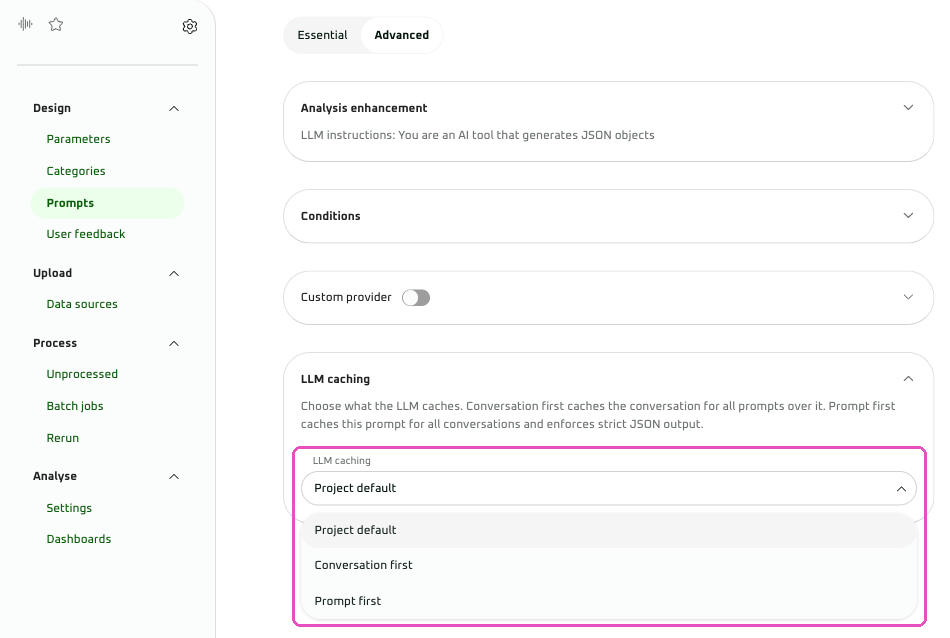
* **LLM caching** per prompt: **Project default**, **Conversation first** (the record is cached for all prompts that run over it) or **Prompt first** (the prompt is cached for all records; enforces strict JSON output). See [Prompts](/insights/workspace/design/prompts.md).

<figure><img src="https://4261467870-files.gitbook.io/~/files/v0/b/gitbook-x-prod.appspot.com/o/spaces%2F6iQTvxgRZRwPS1NgIGEb%2Fuploads%2Fgit-blob-4088f6028c15dc838ee796a124b2ff61bc5fafb4%2Finsights-parameter-json.png?alt=media" alt="A Custom parameter with a JSON output format and a definition asking for a JSON object"><figcaption><p>A parameter with the JSON output format</p></figcaption></figure>

<figure><img src="https://4261467870-files.gitbook.io/~/files/v0/b/gitbook-x-prod.appspot.com/o/spaces%2F6iQTvxgRZRwPS1NgIGEb%2Fuploads%2Fgit-blob-5a82faa3343d078c2297d724343bb972f7ac16b1%2Finsights-prompt-caching.png?alt=media" alt="The Advanced tab of a prompt with the LLM caching choice Project default, Conversation first or Prompt first"><figcaption><p>LLM caching per prompt</p></figcaption></figure>

### Digital Studio

* **Realtime agents:** **gpt-realtime-2.1-mini** can be selected as the model.
* **Transfer node:** the project picker no longer offers the project you have open, and lists projects alphabetically.
* **AI node:** reasoning settings are shown also for models whose deployment name differs from the standard one, for example `gpt6luna` or dated GPT-5 versions.

<figure><img src="https://4261467870-files.gitbook.io/~/files/v0/b/gitbook-x-prod.appspot.com/o/spaces%2F6iQTvxgRZRwPS1NgIGEb%2Fuploads%2Fgit-blob-62fe06e1863cd17f005f396356452de51ba89a79%2Frealtime-model-voice.png?alt=media" alt="The Model and Voice card of a realtime agent with Realtime provider, Realtime model, Reasoning effort and Voice model"><figcaption><p>The realtime model choice of a realtime agent</p></figcaption></figure>

### Behaviour change: AI node errors

When the AI node fails (for example a timeout), its response variable now contains an empty `response_text` together with the `error`. Before, `response_text` was missing, so a message using `{response.response_text}` showed – or read out – the raw placeholder. Check flows that test for a missing `response_text` to detect an error; test the `error` field instead.

### Other changes

* **Voice:** when the caller interrupts the bot, recognition can continue after the first result, so a longer interruption is not cut off. It is used when the flow sets `barge_in_partial_stt_result_silent_time`; without it, nothing changes.

## Release 03.10.2026

<table><thead><tr><th width="366">Application</th><th>Version</th></tr></thead><tbody><tr><td>Builder</td><td>v2.5.189</td></tr><tr><td>Builder Server</td><td>v2.4.118</td></tr><tr><td>NLP Engine &#x26; Intent resolver</td><td>v1.29.46</td></tr><tr><td>Voice</td><td>v1.20.97</td></tr><tr><td>Voice Connector</td><td>v2.0.74</td></tr><tr><td>DA Bubble</td><td>v0.3.95</td></tr><tr><td>Realtime voice control</td><td>v0.0.67</td></tr></tbody></table>

### ElevenLabs speech-to-text: multilingual recognition, entity detection, background filtering

* **Multilingual STT**: set `stt_language` to `auto` and list the other expected languages in `stt_secondary_languages`. Recognition then works well for customers who switch languages. For now, both are set as variables in the flow.
* **Entity detection**: the model can detect a wide range of entities in what the caller says and set them to flow variables automatically.
* **Background audio filtering**: suppresses background noise before recognition. Feedback on how it performs on your calls is welcome.

### ElevenLabs text-to-speech: v4 Turbo model

The new **ElevenLabs v4 Turbo** TTS model is as fast as the Flash model and much better for our local languages, including numbers and dates. It is also available for realtime voice. We recommend it for new voice projects.

### Realtime agents: test in Studio, analytics, new models

* **Test in Studio:** a realtime agent has its own test bubble – click **Start talking** to place a live voice call with the current configuration.
* **Analytics:** on the agent's **Analytics** page, **Connect to Insights** sends finished calls to an Insights Audio project – analysing the **Audio** (higher precision, higher cost) or only the **Transcript** (lower cost). See [Analytics with Insights](/realtime-agent/analytics-with-insights.md).
* **New Gemini models** in the realtime engine: `gemini-3.8-live` and `gemini-3.8-live-extended-thinking`. They are not in the Studio model list yet – enter them as a **Custom model ID**.

<figure><img src="https://4261467870-files.gitbook.io/~/files/v0/b/gitbook-x-prod.appspot.com/o/spaces%2F6iQTvxgRZRwPS1NgIGEb%2Fuploads%2Fgit-blob-4e44c4af34376ec36ef4069d2d6821873f0b9185%2Frealtime-voice-chat.png?alt=media" alt="The Voice chat test bubble of a realtime agent with the Start talking button"><figcaption><p>Start talking – a test call from the editor</p></figcaption></figure>

<figure><img src="https://4261467870-files.gitbook.io/~/files/v0/b/gitbook-x-prod.appspot.com/o/spaces%2F6iQTvxgRZRwPS1NgIGEb%2Fuploads%2FxUz6nJCnfBdHmSiZs85t%2Frealtime-test-call.png?alt=media" alt="A realtime agent in Digital Studio during a test call: the call panel shows Listening with the speaker, microphone and hang-up buttons"><figcaption><p>A running test call – Listening, with mute and hang-up</p></figcaption></figure>

<figure><img src="https://4261467870-files.gitbook.io/~/files/v0/b/gitbook-x-prod.appspot.com/o/spaces%2F6iQTvxgRZRwPS1NgIGEb%2Fuploads%2Fgit-blob-b3b2080078a7b85277a7c63a5ac80306c4f2ce5a%2Frealtime-analytics.png?alt=media" alt="The Connect to Insights card with the Project list, Analyse set to Audio or Transcript and the Connect button"><figcaption><p>Connect to Insights on the Analytics page</p></figcaption></figure>

### DA Bubble

* **Geolocation and Map widgets:** a form can ask for the customer's location (sent to the flow as latitude and longitude, optionally with an address) and show places on a Google map.
* **Rating per answer:** the variable `message_rating_enabled` (`true`/`false`) turns the rating thumbs on or off for one answer, regardless of the bubble setting. Ratings are stored with the rated turn in the conversation logs, also for voice.
* **Input character limit:** in **Bubble design** › **Set-up** › **Extras**, limit how many characters the customer can type (40–2,500; off by default). A counter appears near the limit.
* Autocomplete ignores diacritics when filtering.

<figure><img src="https://4261467870-files.gitbook.io/~/files/v0/b/gitbook-x-prod.appspot.com/o/spaces%2F6iQTvxgRZRwPS1NgIGEb%2Fuploads%2Fgit-blob-952d80b069e3452bb2fbdd4abfafba0fdc8c342b%2Fbubble-design-setup.png?alt=media" alt="Bubble design, Set-up tab, with the Extras switches including Rate response and Input character limit"><figcaption><p>Set-up › Extras in Bubble design, with Input character limit</p></figcaption></figure>

### Digital Studio

* **AI node:** GPT-6 models are recognised as reasoning models, so their reasoning settings are shown. A `binary_` variable can contain a list of URLs; each file is downloaded.
* **Folders:** moving projects out of a folder removes them from that folder (before, they were only added to the new one). The current folder is no longer offered as the target.
* **Transfer node:** a long project name or description in the picker shows in full on hover.

## Release 23.09.2026

<table><thead><tr><th width="366">Application</th><th>Version</th></tr></thead><tbody><tr><td>Builder</td><td>v2.5.170</td></tr><tr><td>Builder Server</td><td>v2.4.103</td></tr><tr><td>NLP Engine &#x26; Intent resolver</td><td>v1.29.39</td></tr><tr><td>Voice</td><td>v1.20.85</td></tr><tr><td>Voice Connector</td><td>v2.0.66</td></tr><tr><td>DA Bubble</td><td>v0.3.80</td></tr><tr><td>Realtime voice control</td><td>v0.0.50</td></tr></tbody></table>

### GPT-6 models in the AI node

The following models can now be selected in the AI node on customer-test and customer-prod:

* **Azure:** GPT 6 Luna EU, GPT 6 Luna Global, GPT 6 Sol EU, GPT 6 Sol Global
* **OpenAI:** GPT 6 Luna, GPT 6 Sol

GPT 6 Astra is deliberately not offered: it is a research-oriented model, not built for conversational AI. There is no GPT 6 Terra.

<figure><img src="https://4261467870-files.gitbook.io/~/files/v0/b/gitbook-x-prod.appspot.com/o/spaces%2F6iQTvxgRZRwPS1NgIGEb%2Fuploads%2FJW2s0WcIJcbrZdayfqmv%2Fai-node-gpt6-models.png?alt=media" alt="The Language Model list of the AI node with GPT 6 Luna EU, GPT 6 Luna Global, GPT 6 Sol EU and GPT 6 Sol Global highlighted"><figcaption><p>The GPT 6 models in the AI node</p></figcaption></figure>

<table><thead><tr><th width="160">Model</th><th>Best for</th><th>Price vs. GPT 5.6</th><th>Quality vs. GPT 5.6</th></tr></thead><tbody><tr><td><strong>GPT 6 Luna</strong></td><td>High-volume routine tasks (summarisation, extraction, simple Q&#x26;A)</td><td>About 50 % cheaper input and 58 % cheaper output than GPT 5.6 Luna</td><td>Factual accuracy on par with GPT 5.6 Sol</td></tr><tr><td><strong>GPT 6 Sol</strong></td><td>Complex work (reasoning, analysis, multi-step agents, tool use)</td><td>50 % cheaper than GPT 5.6 Sol, roughly the price of GPT 5.6 Terra</td><td>About half the factual error rate of GPT 5.6 Sol; stronger on coding and agentic tasks</td></tr></tbody></table>

In our tests the GPT 6 models were as fast as GPT 5.6 (about 0.7 s to first token for Luna, about 1 s for Sol).

**Recommendation:** for new projects, prefer GPT 6 Luna over GPT 5.6 Luna / Terra for routine tasks, and GPT 6 Sol over GPT 5.6 Sol for complex ones. Existing flows are not affected and default models stay the same. If you switch an existing production flow, test it on customer-test first.

### DA Bubble: response ratings and literal text

* **Rate response:** switch it on in **Bubble design** › **Set-up** › **Extras** to show like/dislike thumbs under the bot's answers. Off by default.
* **`<no-format>` regions:** text between `<no-format>` and `</no-format>` in a bot message is shown exactly as written – no Markdown, links or buttons. Messages typed by customers are always shown literally, with their line breaks.
* Importing a bubble with a name that already exists is refused.

<figure><img src="https://4261467870-files.gitbook.io/~/files/v0/b/gitbook-x-prod.appspot.com/o/spaces%2F6iQTvxgRZRwPS1NgIGEb%2Fuploads%2Fgit-blob-952d80b069e3452bb2fbdd4abfafba0fdc8c342b%2Fbubble-design-setup.png?alt=media" alt="Bubble design, Set-up tab, with the Extras switches including Rate response"><figcaption><p>Rate response in Set-up › Extras</p></figcaption></figure>

### Chat no-input timeout now works

The chatbot-specific no-input timeout announced in release 09.09.2026 is now enforced: when the variable `chatbot_no_input_timeout` (seconds) is set, the flow gets a `no_input` signal after that time without a message from the customer. Invalid values turn it off.

### Other changes

* **AI node:** an MCP tool can return documents, which the AI node reads in the same turn.
* **Data masking:** every masked value is now shown as `[**MASKED**]`. Before, each type had its own tag, such as `[IBAN]` or `[CARD_NUMBER]`.
* **Realtime avatars:** OpenAI and Azure avatar sessions can speak with an ElevenLabs voice.
* **Security:** the public chat connection limits connections and messages per IP address and refuses messages over 2,500 characters; the bubble checks link schemes and cross-frame messages.

## Release 16.09.2026

<table><thead><tr><th width="366">Application</th><th>Version</th></tr></thead><tbody><tr><td>Builder</td><td>v2.5.164</td></tr><tr><td>Builder Server</td><td>v2.4.90</td></tr><tr><td>NLP Engine &#x26; Intent resolver</td><td>v1.29.33</td></tr><tr><td>Voice</td><td>v1.20.78</td></tr><tr><td>Voice Connector</td><td>v2.0.62</td></tr><tr><td>DA Bubble</td><td>v0.3.70</td></tr><tr><td>Realtime voice control</td><td>v0.0.44</td></tr></tbody></table>

### AI node: all providers, more tool rounds

* AI node 2.0 and AI intents offer every LLM provider set up in your environment – no longer only OpenAI, Azure, Groq and Gemini.
* The AI node can now use tools in up to **10 rounds** per turn (before 5). Longer chains of tool calls used to end without an answer.

<figure><img src="https://4261467870-files.gitbook.io/~/files/v0/b/gitbook-x-prod.appspot.com/o/spaces%2F6iQTvxgRZRwPS1NgIGEb%2Fuploads%2FNdWLvoSfuxV4BZGzJEwE%2Fai-node-ai-provider.png?alt=media&amp;token=f137608a-d12a-4d73-a6d7-969d37cddccf" alt="The AI provider card of the AI node with Provider and Language Model"><figcaption><p>Provider and model in the AI node</p></figcaption></figure>

### Voice

* **ElevenLabs TTS model:** when you choose ElevenLabs in **Deploy** › **Voice**, pick the **TTS model**; Eleven v3 is supported.
* **SIP headers from the flow:** variables named `X_<Name>` are sent as `X-<Name>` SIP headers when a call is transferred to a conference.

<figure><img src="https://4261467870-files.gitbook.io/~/files/v0/b/gitbook-x-prod.appspot.com/o/spaces%2F6iQTvxgRZRwPS1NgIGEb%2Fuploads%2Fgit-blob-4c2c34c44437a2e73d85ac98ff56def4c39fb704%2Fdeploy-essential-voice-latency.png?alt=media" alt="The Voice section of the Deploy dialog with the provider ElevenLabs and the TTS model"><figcaption><p>ElevenLabs with its TTS model in Deploy › Voice</p></figcaption></figure>

### Other changes

* **Tools:** in the variable editor, tools can be found also by their technical name, for example `pronounce_number`.
* **DA Bubble:** a conversation can be handed over from the website to the customer's mobile app (for developers: `prepareTransfer()` in the bubble API).

## Release 09.09.2026

<table><thead><tr><th width="366">Application</th><th>Version</th></tr></thead><tbody><tr><td>Builder</td><td>v2.5.156</td></tr><tr><td>Builder Server</td><td>v2.4.82</td></tr><tr><td>NLP Engine &#x26; Intent resolver</td><td>v1.29.26</td></tr><tr><td>Voice</td><td>v1.20.69</td></tr><tr><td>Voice Connector</td><td>v2.0.53</td></tr><tr><td>DA Bubble</td><td>v0.3.65</td></tr><tr><td>Realtime voice control</td><td>v0.0.38</td></tr></tbody></table>

### Azure Voice Live for speech recognition and synthesis

Azure Voice Live is available as both an STT and a TTS provider. Pick it in the agent's voice settings in Digital Studio (deploy modal), in the same recognition and synthesis provider dropdowns as the other providers. For STT it uses the `mai_transcribe` model.

<figure><img src="https://4261467870-files.gitbook.io/~/files/v0/b/gitbook-x-prod.appspot.com/o/spaces%2F6iQTvxgRZRwPS1NgIGEb%2Fuploads%2FXVLjJBJmtgg2SxQqaxLh%2Fdeploy-stt-voice-live.png?alt=media" alt="The Speech to text provider list in the Deploy dialog with AZURE_VOICE_LIVE highlighted"><figcaption><p>Azure Voice Live in Deploy › Speech to text</p></figcaption></figure>

* On customer-test it is fully configured: endpoint, credentials and the voice catalogue are in place, so you can place a call on it right away.
* In other environments it needs an endpoint and credentials first. Until they are set, the providers advertise no voices and Digital Studio does not offer them. This is the intended default, not a fault.

### One conversation in several places, and it survives interruptions

Until now a conversation lived in one browser tab, one session and one server instance. That constraint is gone:

* **Resume by ID**: a conversation can be resumed by its identifier. A customer who navigates away and comes back, or moves from desktop to mobile or between channels, continues the same conversation with its history loaded.
* **Several clients at once**: two browser tabs, or the bubble plus the client's own application, can be connected to the same conversation at the same time. Interactive widgets stay in sync across them, so a form filled in one tab is shown in the other.
* **High availability**: the voice application can run as several instances. If an instance disappears, the conversation continues on another one with full history, after a short pause. This was certified on an overnight run of over 13,000 conversations and a disruption matrix covering crashes, rolling updates, connector restarts and database outages. High availability is on for customer-test; for other environments it is opt-in and has deployment requirements, so arrange it with the platform team.

### Realtime voice calls in CIA analytics

Realtime calls can now be sent to CIA analytics without custom workarounds. Select the CIA projects the call should go to in the realtime configuration.

* The finished call is handed over with its transcript and recording **after** the call, so the end of the call is not delayed. If analytics is not ready to receive, the hand-over is retried until a retention period expires.
* Call recordings can be downloaded as plain audio, with a lightweight availability check that reports the size without transferring the file.

### Realtime calls can wait through silence

A new opt-in capability per realtime agent: the call can wait through silence or background noise instead of treating it as the customer's turn. The bot no longer jumps in while the customer pauses to think, or answers background noise. The opening greeting is never suppressed.

**Important:** the Digital Studio toggle for this did not ship in this release. Until it does, the setting is enabled on the agent by the platform team.

### Digital Studio improvements

* **MCP servers in the AI node can be switched off and edited in place.** Each configured server has its own on/off switch. Disconnecting unlocks the connection for editing and restores your tool selection when you reconnect. Existing servers stay switched on.
* **Organization admins can manage scheduled reports** without a platform-level account. Already applied on customer-test for every organization.
* **Insight Analytics accepts independent from and to filters**, so open-ended date ranges can be expressed. Applies to rerun, copy, results and category-suggestion views.
* **The realtime agent's model list matches what the provider offers**, without retired models.

<figure><img src="https://4261467870-files.gitbook.io/~/files/v0/b/gitbook-x-prod.appspot.com/o/spaces%2F6iQTvxgRZRwPS1NgIGEb%2Fuploads%2Fkmz1yAfp9xjOCICzBYz4%2Fai-node-mcp-toggle.png?alt=media" alt="MCP server switch in the AI node, with the Indexer MCP tools"><figcaption><p>MCP server switch in the AI node, with the Indexer MCP tools</p></figcaption></figure>

### New flow Tools: file upload and signed assertion for OAuth2

* **File uploads**: requests support multipart uploads with binary content, and a new step uploads a file to blob storage using only the destination and credentials the flow supplies. A flow can deliver documents into a client's own storage.
* **Signed client assertion for OAuth2**: for identity providers that do not accept a client secret, the flow signs an assertion with a stored key and exchanges it for a token.

### Other changes

* **Fixed:** with *Reuse utterance* on, a per-signal fallback target in the Answer node was discarded when the flow was saved. If you have Answer nodes that combine utterance reuse with per-signal fallbacks, reopen and verify them.
* **Not active yet:** a chatbot-specific no-input timeout is visible in the Answer node's Timing section, but nothing enforces it yet. Do not rely on chat-specific timeouts until the backend part is released.
* Container images hardened and one library updated for a published vulnerability.

## Release 02.09.2026

<table><thead><tr><th width="366">Application</th><th>Version</th></tr></thead><tbody><tr><td>Builder</td><td>v2.5.146</td></tr><tr><td>Builder Server</td><td>v2.4.79</td></tr><tr><td>NLP Engine &#x26; Intent resolver</td><td>v1.29.22</td></tr><tr><td>Knowledge base indexer</td><td>v0.0.34</td></tr><tr><td>Voice</td><td>v1.20.67</td></tr><tr><td>Realtime voice control</td><td>v0.0.35</td></tr></tbody></table>

### Copy YAML and Copy JSON

Two new buttons copy a whole flow configuration to the clipboard:

* **Copy YAML**: open a flow > code editor > top bar, next to **Show changes**. Copies exactly what the editor shows.
* **Copy JSON**: flow editor navbar, next to the search field. Copies the same payload as the JSON export.

Both confirm with a toast and tell you if copying failed.

<figure><img src="https://4261467870-files.gitbook.io/~/files/v0/b/gitbook-x-prod.appspot.com/o/spaces%2F6iQTvxgRZRwPS1NgIGEb%2Fuploads%2FdK1epq6Fi1i9adM4n0Cu%2Fcopy-yaml.png?alt=media" alt="Copy YAML in the code editor"><figcaption><p>Copy YAML in the code editor</p></figcaption></figure>

<figure><img src="https://4261467870-files.gitbook.io/~/files/v0/b/gitbook-x-prod.appspot.com/o/spaces%2F6iQTvxgRZRwPS1NgIGEb%2Fuploads%2FmU16cjUsgz1MLQQDkyn3%2Fcopy-json.png?alt=media" alt="Copy JSON in the flow editor"><figcaption><p>Copy JSON in the flow editor</p></figcaption></figure>

**Important:** the copy is verbatim and **includes the values of secret variables**, so that pasting it back does not overwrite real credentials with placeholders. Treat the clipboard content as credentials: check `configuration.secret_variables` before pasting it into a ticket, chat or e-mail.

### One knowledge base index can serve several projects

* **Cross-project index**: set `index_project_id` in the flow before an AI node that uses the Indexer MCP. `index_name` / `index_id` / `index_names` / `index_ids` are then resolved in that project instead of the conversation's own project. One project can host a knowledge base that flows in other projects answer from.
* **The organization is a hard boundary.** Only the project can be redirected; the organization always comes from the conversation.
* **Runtime selection**: any index setting left empty on the node is filled from a conversation entity of the same name. A value set on the node always wins.
* **Watch out:** if `index_project_id` is invalid or missing, the lookup falls back to the conversation's own project.
* **Copy several indexes at once**: Knowledge base > select more than one index > **Duplicate indexes** > pick the target project. Copies keep their names. If some copies fail (typically a name collision), the **Retry duplicate indexes** dialog lets you rename just the failed ones.

### Answer node: new defaults

* **New Answer nodes have "Conversation ends" switched on.** If you leave the target empty and save, Digital Studio creates a flow-wide `END_HANGUP` node (once per flow) and connects the node to it. Existing Answer nodes do not change.
* An Answer node with no intents yet opens on the **Configuration** tab instead of an empty Intents list.

### Voice: DTMF input finishes at its configured length again

When a flow asked for a fixed-length number (account number, date of birth) and the caller typed all digits, the bot waited until the DTMF timeout. The expected length is no longer reset between turns, so input completes as soon as the last digit is entered.

### Realtime voice: repeated no-input reminders, then hang-up

A caller who stayed silent used to get one reminder, after which the call stayed open until the duration cap. Now the reminder can repeat after each silent turn, and on the Nth consecutive silence the call ends through the normal end-of-call path: farewell, hang-up, reported like any completed call.

* Configure per project: `no_input_reminder.enabled`, `no_input_reminder.timeout_seconds`, `no_input_reminder.max_consecutive`.
* Without `max_consecutive`, the reminder stays one-shot as before.
* Speech from the caller resets the counter; an operator injecting text cancels a pending hang-up.
* On the digital-human / avatar path there is nothing to hang up, so at the limit the reminders simply stop.

### Digital Studio sign-in: password change and logout take effect immediately

* A password change or reset ends every signed-in session for that account, on every device, immediately. Previously other devices kept working for up to an hour.
* Logout, "sign out from all devices" and a role change also invalidate the access token immediately, in every environment.
* Open realtime connections in Digital Studio are disconnected too.

Users will see "why was I logged out?" moments after a password reset or role change. This is intended; they just sign in again.

### Other changes

* **Copying analytics entities from another project supports AND/OR filters**, with a matching-record count you must check before copying.
* **Ending a test conversation in Digital Studio no longer starts a hidden new one**, which used to inflate conversation counts.
* **The maximum-login-attempts setting** now reads correctly for every organization.
* **Knowledge base documents count how often search returns them**, as groundwork for knowledge-base health reporting. Counting starts from now.
* The obsolete `RECORD_STT` voice setting is removed; `SAVE_STT_AUDIO` is the setting that controls STT audio capture.
* Container images hardened across all applications in the release, with no functional change.

## Release 26.08.2026

<table><thead><tr><th width="366">Application</th><th>Version</th></tr></thead><tbody><tr><td>Builder</td><td>v2.5.139</td></tr><tr><td>Builder Server</td><td>v2.4.72</td></tr><tr><td>NLP Engine &#x26; Intent resolver</td><td>v1.29.19</td></tr><tr><td>Voice</td><td>v1.20.64</td></tr><tr><td>Voice Connector</td><td>v2.0.52</td></tr><tr><td>DA Bubble</td><td>v0.3.54</td></tr><tr><td>Realtime voice control</td><td>v0.0.34</td></tr></tbody></table>

### Bubble design export and import

A bubble design can be exported to a file and imported into another project or environment as a new configuration, instead of re-entering every colour, font and label. Digital Studio > **Bubble design** > **"…" menu** (top right) > **Import** / **Export**. Existing bubbles are not affected.

<figure><img src="https://4261467870-files.gitbook.io/~/files/v0/b/gitbook-x-prod.appspot.com/o/spaces%2F6iQTvxgRZRwPS1NgIGEb%2Fuploads%2FVmnsrlSCgsSm2GXWd5rW%2Fbubble-design-import-export.png?alt=media" alt="Import and Export in the Bubble design menu"><figcaption><p>Import and Export in the Bubble design menu</p></figcaption></figure>

### New flow Tools: three extractors that resolve entities without an LLM

Platform-level tools available in the Tools picker for every project. On a 261-phrase currency dictionary, an LLM prompt reached 97.7 % accuracy at about 1,400 ms per turn; the extractor reached 100 % in a fraction of a millisecond.

* **Currency extractor** (`currency`): returns ISO 4217 codes in the order they appear, so source and target currency can be told apart. `"chcem zmenit 100 eur na dolare"` → `["EUR", "USD"]`. Options: **Allowed ISO codes**, **Get indices**.
* **Amount extractor** (`amount`): reads a sum of money, keeps the decimal part and pairs it with the currency. `"chcem 1 500,50 czk"` → `[{value: 1500.5, currency: "CZK"}]`.
* **Enum match** (`enum_match`): a generic shared dictionary of `synonym,VALUE` lines matched on whole tokens. Ships with a `rate_types` dictionary: `"poslem to prevodom na ucet"` → `["TRANSFER"]`.

**Language coverage:** `currency` and `amount` support Slovak only for now. All three do nothing until configured in a flow.

### AI nodes joining a shared conversation thread get their own instructions

Applies to chained AI nodes with unlimited history (using the previous response ID). Previously only the node that opened the thread received its instructions; nodes joining later ran with the first node's instructions, which could, for example, drop a reporting node's output structure. Instructions are now re-stated whenever they change. Conversations in progress correct themselves on their next turn.

### Voice and realtime: no more duplicate bot sessions on one call

When the telephony provider delivered the same incoming-call notification twice, two realtime sessions could start for one call and talk over each other. The call is now claimed before any slow work starts, so duplicates are dropped, and the provider is acknowledged immediately so it no longer re-sends.

### Bubble fixes

* A hard refresh no longer leaves the microphone dead in a synchronised chat.
* A message sent while the connection was re-establishing can no longer be lost silently.
* The in-bubble sidebar menu is no longer washed out on branded (non-white) bubbles.

### Call transcripts with more than two speakers

In the call recording and transcript view, calls with three or more speakers (transfer, conference) show each speaker with its own colour and a "Speaker N" label. Two-party calls look the same as before.

### Behaviour changes

* **A new MCP server in an AI node defaults to Local, not Cloud.** Existing nodes are unchanged.
* **A realtime agent can no longer have two MCP servers with the same URL.** The check runs on save and on deploy, so an agent that already has a duplicate is rejected on its next deploy with *"Agent MCP server configuration contains duplicate MCP server URL."* Remove the duplicate first.

### Other changes

* Project import works again on Keycloak environments.
* The organization sidebar shows **Users** and **Settings** immediately.
* Realtime: an image is hidden on small screens instead of being rendered too small.
* Builder Server error responses are sanitised more strictly (security hardening).

## Release 19.08.2026

<table><thead><tr><th width="366">Application</th><th>Version</th></tr></thead><tbody><tr><td>Builder</td><td>v2.5.133</td></tr><tr><td>Builder Server</td><td>v2.4.66</td></tr><tr><td>NLP Engine &#x26; Intent resolver</td><td>v1.29.15</td></tr><tr><td>Voice</td><td>v1.20.62</td></tr><tr><td>Voice Connector</td><td>v2.0.51</td></tr><tr><td>DA Bubble</td><td>v0.3.51</td></tr><tr><td>LLM connector</td><td>v0.1.34</td></tr></tbody></table>

### Bubble design: new three-tab layout

Bubble design is reorganised into **Set-up**, **Colors** and **Text** (font and all labels moved into the new Text tab). All actions are at the top, choosing and naming a bubble are merged into one control, and you can **deploy directly from Bubble design**: you are prompted after **Save**, or when the deployed configuration differs from the saved one.

<figure><img src="https://4261467870-files.gitbook.io/~/files/v0/b/gitbook-x-prod.appspot.com/o/spaces%2F6iQTvxgRZRwPS1NgIGEb%2Fuploads%2Fgit-blob-952d80b069e3452bb2fbdd4abfafba0fdc8c342b%2Fbubble-design-setup.png?alt=media" alt="Bubble design: Set-up tab with the AI disclaimer and End conversation button toggles"><figcaption><p>Bubble design: Set-up tab with the AI disclaimer and End conversation button toggles</p></figcaption></figure>

### Bubble: "AI can make mistakes" disclaimer

A short notice above the chat history that AI answers may be wrong. It scrolls with the messages and uses the existing message styling.

* Switch it on: Bubble design > **Set-up** > **Extras** > **AI disclaimer**. Off by default.
* Change the wording: Bubble design > **Text** > **AI disclaimer** > pencil icon > **Label**. Default: *"AI Agents can make mistakes. Verify important info."* It is one string per bubble, with no per-language variants.

### Bubble: inactivity reminders and conversation timeout

Three independent timers, all off by default, configured per bubble in Bubble design > **Set-up** > **Global chat timing**:

* **In progress** tab (conversation running):
  * **Inactivity reminder** + "Show after" (default 60 s): an in-chat panel with title, live countdown, description and a Continue button.
  * **End conversation** + "End after" (default 120 s).
  * The two timers run in sequence: with the reminder on, the end-conversation timer starts after the reminder fires.
  * Reset by opening or closing the bubble, clicks, typing, scrolling, mouse movement (bubble open) and bot messages. A websocket disconnect pauses them.
* **Not started** tab (teaser next to the closed bubble): **Inactivity reminder** + "Show after" (default 30 s) and "Hide after" (default 5 s), or **Never hide**. Runs only when auto-open is off and no conversation has started, at most once per session.
* All texts are in Bubble design > **Text**, sections **Conversation not started**, **Open bubble reminder** (`{seconds}` is replaced by the live countdown) and **End**.
* The two "In progress" timers can be overridden per turn from the flow with `bubble_inactivity_reminder_enabled`, `bubble_inactivity_reminder_timeout_seconds`, `bubble_conversation_timeout_enabled` and `bubble_conversation_timeout_seconds`.

<figure><img src="https://4261467870-files.gitbook.io/~/files/v0/b/gitbook-x-prod.appspot.com/o/spaces%2F6iQTvxgRZRwPS1NgIGEb%2Fuploads%2FhVpvi1XFPMamC89O1HkW%2Fbubble-global-chat-timing.png?alt=media" alt="Global chat timing in Bubble design"><figcaption><p>Global chat timing in Bubble design</p></figcaption></figure>

### Widgets

* **Widget above the AI text**: set `widget_position: "before_text"` on the widget payload returned by your MCP tool, for example for a confirmation card that should be read before the follow-up question.
* **Widget survives a digression**: set `persistOnSkip: true` on the widget's root node. If the customer asks something unrelated while a form is on screen, a fresh interactive copy is shown below the answer.
* **Autocomplete widget**:
  * `AutocompleteProvider` is an invisible node that watches a form field, debounces (`debounceMs`, default 250 ms) and sends the query over the existing talk-to-agent WebSocket. Results are written to widget state under `stateKey`; `limit` is clamped to 1–10.
  * `Autocomplete` reads options from that state (`optionsFrom: { "type": "state", "key": "..." }`), a hardcoded `options` list or a named entity.
  * Filtering: `filter: { fields, mode, caseSensitive }` with modes `contains` (default), `startsWith`, `equals` and the new `tokens` (all query words must appear, in any order).
  * `submitMetadata: true` submits the option's metadata fields alongside the label; a map such as `{ "metadata.streetKey": "streetKey" }` picks and renames them.
* Unanswered widgets are disabled once the conversation can no longer act on them.

### Answer node redesign

The Answer node configuration dialog is rebuilt:

* **Entities**: tools and variables run either **Before input** (pre-processing) or **After input** (post-processing).
* **Intents**: AI intents are expanded by default; dynamic buttons, keywords, conditions and training set are collapsed. **Add intent** opens a type menu, and intents can be searched. **New:** the AI intent recognition can use any provider and model, as in the AI node.
* **Configuration**: advanced settings moved here.
* **Fallback**: with **split signals** on, the general fallback splits into five configurable signals: No intent recognised, No input, Not understood, No match, Shut up.

### Realtime voice: agent history

* A history drawer shows a timeline (newest first) with time, user, change type and the affected parameter, with FROM / TO values where relevant.
* **Undo / redo** in the editor.
* Recorded events: configuration changes, deploy, restore, disconnect / un-deploy, created / imported. Changes are grouped by Prompt, MCP server, Skill, Provider settings, Transcription, Turn detection, Deployed, Restored.
* Deployment rules: an agent is live if at least one phone number is deployed; one phone number has exactly one active configuration (deploying again is a redeploy); a history entry that was never deployed must be **restored** before it can be deployed.

### Other changes

* Duplicating a bubble design copies the selected design.
* Insight Analytics: boolean values in result filters, corrected parameter list filtering, and custom dashboard thumbnails.
* Digital Studio works with AWS DocumentDB-backed deployments.
* Document upload progress can be queried on the public API.
* A conversation is always continued with the flow it was started with.
* An MCP server whose name contains a space no longer breaks the AI node.
* Voice asynchronous operations: a waiting call resumes directly from the result and the waiting state survives a restart. **New default:** a call waiting for more than 15 minutes is hung up (`WAITING_STATE_TTL_MS`, default `900000`).
* Voice Connector: support for a private certificate authority (`VOICE_SERVER_CA_CERTIFICATE_PATH`), local hold/loop audio (`LOCAL_PLAY_LOOP_SOUND_PATH`) and an explicit advertised address (`CONNECTOR_API_ADVERTISED_HOST` / `_PORT` / `_URL`). All optional.

## Release 12.08.2026

### Flow editor: conversation tracing and Spotlight mode

* Moving through nodes with the arrows inside a node shows the trace in the flow.
* **Spotlight mode**: open any node with the Alt / Option key pressed. The node opens on the left and the nodes you trace through are highlighted.

<figure><img src="https://4261467870-files.gitbook.io/~/files/v0/b/gitbook-x-prod.appspot.com/o/spaces%2F6iQTvxgRZRwPS1NgIGEb%2Fuploads%2FVFddYnI32i5VjotTtTOr%2Fspotlight-mode.gif?alt=media" alt="Spotlight mode: tracing a conversation through the flow"><figcaption><p>Spotlight mode: tracing a conversation through the flow</p></figcaption></figure>

### Bubble

* **Document drag and drop**: when upload is enabled, documents can be dropped into the bubble or uploaded via the widget.
* **One conversation across browser tabs**: several tabs of the same site share one conversation.

### LLM failover to a backup Azure region

The LLM connector can fail over to a backup Azure region when the primary region is unavailable. It has to be configured per environment.

### Security

* Optional **single-session mode** for Digital Studio: signing in on another browser or device signs out the previous session. Several tabs in the same browser still work. Not applied on multitenant environments.
* Several security findings addressed.

## Release 05.08.2026

<table><thead><tr><th width="366">Application</th><th>Version</th></tr></thead><tbody><tr><td>Builder</td><td>v2.5.114</td></tr><tr><td>Builder Server</td><td>v2.4.50</td></tr><tr><td>Voice</td><td>v1.20.56</td></tr><tr><td>Knowledge base indexer</td><td>v0.0.28</td></tr><tr><td>DA Bubble</td><td>v0.3.33</td></tr></tbody></table>

### Bubble: configurable end-conversation button

Bubble design > **Set up** > **Extras** > **End conversation button** (default on).

* **Off**: the X control disappears completely, including the Ctrl+Alt+X shortcut. Visitors cannot end or restart the conversation from the bubble; minimise stays available.
* **On**: the End / Restart menu now opens on tap or click, not only on hover. On mobile, a single tap on the X no longer discards the conversation.

### Voice: the flow can continue while audio is still playing

With **Execute message first** on in the Message node, the bot used to wait for the whole prompt to finish before the flow moved on. Set the variable `message_played_type` on the turn:

* `after_playback` (default): the flow continues after the prompt has played.
* `immediate`: the flow continues as soon as the prompt starts playing.

Example: an 8 s "please hold on, I'm checking your contract" prompt followed by a 6 s backend call takes about 14 s with `after_playback` and about 8 s with `immediate`. Applies to turns with `GOTO_STOP`; the next response is queued after the current audio, so nothing overlaps.

### Indexer MCP: read and update a knowledge base

The Indexer MCP server can read a knowledge base and write back into it, not only search it.

* **Read endpoint** `<indexer>/mcp`:
  * `search_knowledge_base`: RAG search (the only tool enabled by default).
  * `get_index_content`: outline of the index (documents, labels, last update, chunk IDs and titles) without chunk bodies. Optional filters `label`, `updated_since`.
  * `get_document_content`: full content of the documents in `document_ids`.
* **Write endpoint** `<indexer>/mcp-write`:
  * `update_chunks`: updates the text of existing chunks (`updates: [{chunk_id, text}]`) and re-embeds them. No adding or deleting chunks.
  * Off by default; enabled per environment with `APP_INDEXER_MCP_WRITE_ENABLED`.
* Organization, project and index always come from the platform context, never from tool arguments. Any ID outside the scoped index rejects the whole call.

## Release 22.07.2026

### Realtime voice: Skills

Skills split a complex realtime use case into focused parts:

* **Agent**: the main prompt (role, behaviour, main instructions) that applies to the whole conversation, plus MCP tools available throughout. Tools enabled here cannot be disabled for a specific skill.
* **Skills**: additional instructions for a specific use case. When the conversation invokes a skill, its prompt is added to the agent prompt, and the MCP tools enabled for the skill become available.

## Release 14.07.2026

### GPT-5.6 models

GPT-5.6 **Sol**, **Terra** and **Luna** are available on customer-test and customer-prod, both in Global and Data Zone deployments. Choose Terra to balance intelligence and cost, or Luna for cost-sensitive, high-volume workloads.

## Release 07.07.2026

### Realtime projects in Digital Studio

Realtime projects can be configured in Digital Studio: a new tile on the welcome screen, or a new product in the dropdown.

* Configure the same settings as in the previous realtime GUI, connect MCP servers to see their tools, and deploy the project to a phone number.
* Existing projects need to be migrated. After migration, changes made in Digital Studio are reflected in the old GUI, but not the other way round.
* Several people can edit the same prompt; changes appear for others almost immediately.

### Connect an MCP server in the AI node

Connect an MCP server in the AI node to see which tools it offers and choose which tools the LLM can use.

### Answering machine detection

For outbound calls only. If the flow sets `amd_detection` to `true`, Voice runs a parallel speech-to-text from the moment the bot starts speaking. When it finishes, `amd_utterance` and `amd_suggestion` are set as flow variables, so the flow can decide whether an answering machine picked up.

### Bubble updates

* The bubble can run as a webview.
* Nested arrays in widget configuration.
* Live chat with a human agent, including a typing indicator.
* Clicked URLs are tracked in the `url_clicked` variable, and a URL click can advance the conversation.
* Text formatting and a carousel widget.
* The bubble meets accessibility requirements.

## Release 02.07.2026

### Indexer MCP server

The knowledge base indexer provides an MCP server, so the LLM can pull the information it needs on demand.

* In the AI node, add an MCP server with the URL `http://indexer:8000/mcp/`.
* Optionally set these variables in the flow:

| Variable                   | What it does                                        | Example        |
| -------------------------- | --------------------------------------------------- | -------------- |
| `index_name`               | Single index by name                                | `faq`          |
| `index_names`              | Several indexes (comma-separated)                   | `faq, pricing` |
| `index_id`                 | Single index by ID                                  | `123`          |
| `index_ids`                | Several indexes by ID (comma-separated)             | `123, 456`     |
| `top_k`                    | Number of results (default 3)                       | `5`            |
| `amount_adjacent_snippets` | Neighbouring snippets added for context (default 0) | `1`            |

The server provides the `search_knowledge_base` tool for semantic search over the scoped indexes.

## Release 20.05.2026

### Prompt library

Build a personal prompt library in Digital Studio and share prompts within your organization. Find it in the left menu of a project, in the **Design** section.

* **Personal**: your own prompts, visible across all organizations you work in.
* **Organization**: prompts visible to all users of the organization. Your shared prompts are marked with a chip. You can edit or remove your own shared prompts, but not prompts created by others (unless you are an admin).
* The library shows how many times each prompt was pulled into an AI node. A pulled prompt is a copy, so editing it in the AI node does not change the library.
* In the AI node, search the library with the book icon, or save the current prompt with **+ Add prompt**. Provider, model and tools are shown for information.

### Document upload in the new bubble

Document upload is supported in the new bubble and is enabled in the Answer node, as in the old bubble.

* Uploaded documents are stored securely in blob storage by the bubble itself; no file content passes through the other applications.
* Only a URL to the file is stored, in the variable `binary_uploaded_document`. The URL is not publicly accessible.
* To process uploaded documents in an AI node, use `binary_uploaded_document`. The content is sent to the LLM but is not logged or stored.