> For the complete documentation index, see [llms.txt](https://docs.borndigital.ai/llms.txt). Markdown versions of documentation pages are available by appending `.md` to page URLs; this page is available as [Markdown](https://docs.borndigital.ai/insights/workspace/process/unprocessed.md).
# Unprocessed
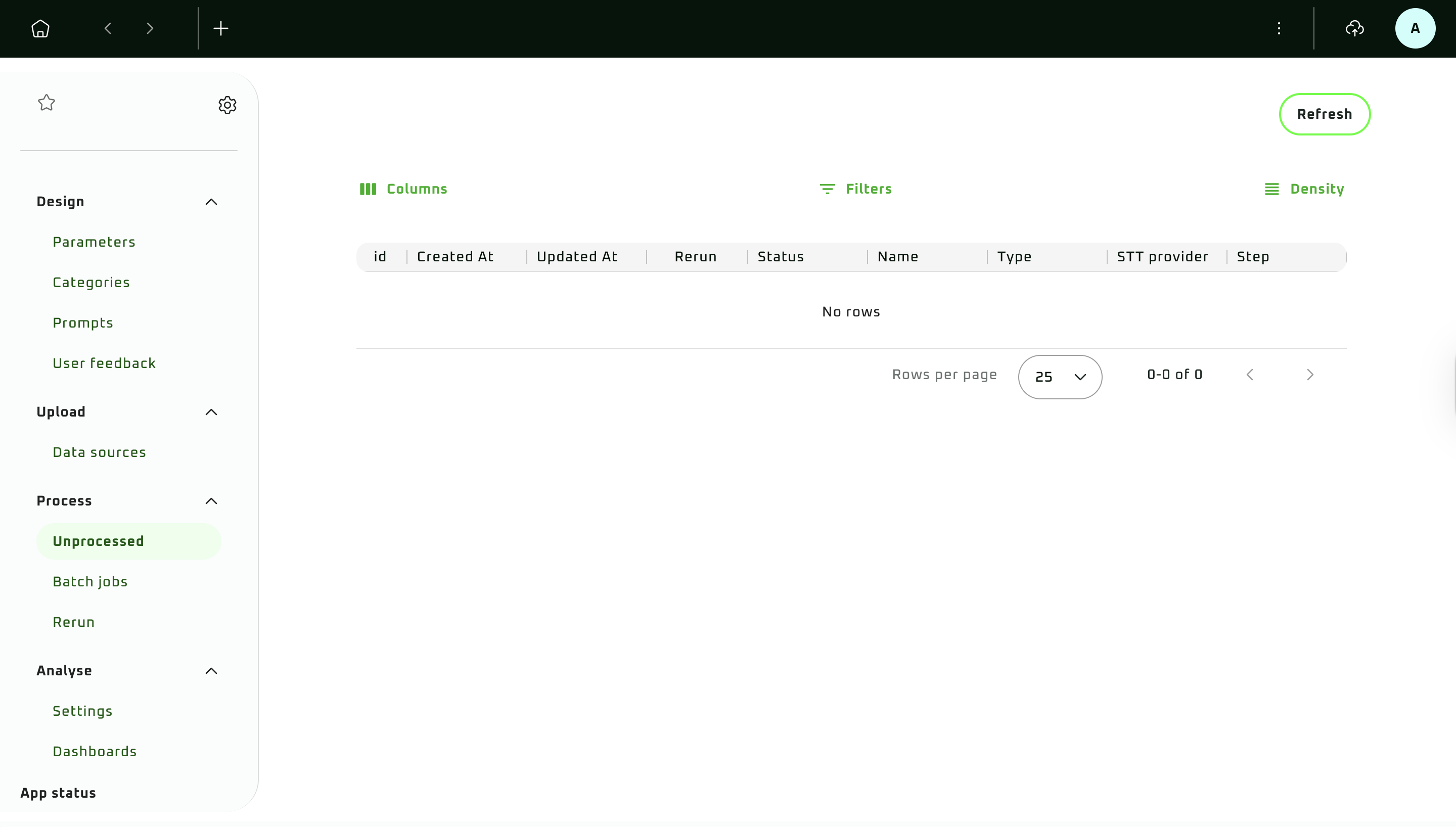
This module serves to display the status of processing files after their manipulation, i.e., data upload, copy, rerun, etc.
On-screen elements:
* **Refresh**: button
* **Table options**:
* **Columns**: button with a dropdown menu with options to display or hide columns in the table, as per the selection
* **Filters**: button for displaying a floating window with options below for creating filtering conditions:
* **Columns**: dropdown menu displaying all available columns
* **Operator**: dropdown menu displaying all possible operators
* **Value**: input field for specifying a value based on which to filter
* **Density**: button with a dropdown menu with text size display options of the rows from smallest to biggest: **Compact**, **Standard**, **Comfortable**
Available operators
* Contains
* Does not contain
* Equals
* Does not equal
* Starts with
* Ends with
* Is empty
* Is not empty
* Is any of
* **Common table columns**:
* **Id**: file or record ID
* **Created At**: date and time when the item was added to the queue
* **Updated At**: date and time of the latest update
* **Rerun**: whether the item comes from a rerun (`True` or `False`)
* **Status**: current processing status
* **Failures**: processing failure details, when available
* **Audio project columns**:
* **Name**: name of the processed file
* **Type**: audio codec or file type
* **STT provider**: the [STT provider](/insights/workspace/upload/data-sources-audio.md#provider-stt) used for transcription
* **Step**: current pipeline stage, such as ingestion, transcription, or enrichment
* **Text/Email project columns**:
* **Body**: record body
* **Meta**: record metadata
* **Debug**: processing debug data
Double-click a populated **Body**, **Meta**, or **Debug** cell to open its details.
* **Table rows and pages**:
* **Rows per page**: dropdown with options 10, 25, 100
* **0-0 of 0**: number of items displayed in the current range. For example, `1-8 of 8`
* **<** and **>**: pagination buttons